

-
CycleTrack and SDN are teaming up to make medical school admissions more transparent and accessible! Read the announcement to learn how we’re supporting the future of CycleTrack’s free application-tracking tools .
You are using an out of date browser. It may not display this or other websites correctly.
You should upgrade or use an alternative browser.
You should upgrade or use an alternative browser.
Feedback Upgrade Styles
Started by FlowRate
Get help with your application
Use all the free resources available to you from SDN: articles, guides, expert advising, forums discussions, and school research.

I previously had "SDN-Dark" which I suppose was different from Basic Dark??? But I presume it's a product of the upgrade.

Yes, some of the other color/template options required an unsupported plug-in. We went with the most common templates.
Advertisement - Members don't see this ad
I noticed something that took me a moment to recognize: I don't do any other social media besides SDN and LinkedIn. However, I have an Android phone. I have not yet looked at SDN on my computer. I don't use the SDN app, but just the website. I notice, now, like on my text app, when reactions are placed, the reactions, instead of being in line, next to each other, they overlap.
I just have to get used to it, but, it's different. I don't like when things follow up, like they're copying.
I just have to get used to it, but, it's different. I don't like when things follow up, like they're copying.

I'm sure I'll get used to it but it would definitely be nice to have more than 2 styles to pick from.

Glad some of the color styles for Basic Dark were fixed. Just a day or so ago, links were dark text on dark background and thus invisible.
My only "nice to have" request is the ability to "stretch" things to better fit a standard widescreen monitor. This isn't apparent when viewing SDN from a phone (portrait mode), but it's more pronounced with a normal 16:9 display. There's a lot of wasted space on the left and right sides. Older themes had a button that toggled the "skinny vs. wide" function.
Not urgent but a nice to have.
My only "nice to have" request is the ability to "stretch" things to better fit a standard widescreen monitor. This isn't apparent when viewing SDN from a phone (portrait mode), but it's more pronounced with a normal 16:9 display. There's a lot of wasted space on the left and right sides. Older themes had a button that toggled the "skinny vs. wide" function.
Not urgent but a nice to have.
I think that's the one I was using previously. I find basic dark to be a little too high contrast (bold 100% white text on black background in the home forum view.)I previously had "SDN-Dark" which I suppose was different from Basic Dark??? But I presume it's a product of the upgrade.
Working on creating a color option that will mimic the old SDN and SDN-Dark option; it will automatically go into dark mode based on your computer settings.
There is a new template available now - "SDN Old Colors". It will honor the settings on your system for light or dark mode (though I've found it sometimes needs to be reset if you "force" it into a mode different from your system settings).
Please let me know if you notice any issues, especially in dark mode.
Please let me know if you notice any issues, especially in dark mode.
SDN Old Colors tests great. Dark mode automatically appeared in Firefox Beta 135.0b2 for Windows 10 Pro just fine.
Attached is an example of the blank space when viewing the forums on a regular 16:9 screen. Probably 2/3 of the space on the left and right is just blank. I miss the little button that would fill the screen horizontally. Not sure if that is a feasible feature to add back.
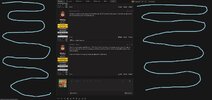
Attached is an example of the blank space when viewing the forums on a regular 16:9 screen. Probably 2/3 of the space on the left and right is just blank. I miss the little button that would fill the screen horizontally. Not sure if that is a feasible feature to add back.

@Stroganoff I LOVE the blank spaces to either side of the forum posts. SO calming. I don't have to worry about accidentally clicking on an ad
Old Colors looks great, but doesn't seem to respect preference for dark mode when system setting is opposite, like you said. One exception to looking great is that highlighting text while writing/editing a post seems to be the same color as background (hard to tell what's highlighted.)There is a new template available now - "SDN Old Colors". It will honor the settings on your system for light or dark mode (though I've found it sometimes needs to be reset if you "force" it into a mode different from your system settings).
Please let me know if you notice any issues, especially in dark mode.
I'll look into the highlight issue.
I'll also see if the "not respecting" problem is a template issue or possibly a bug.
I'll also see if the "not respecting" problem is a template issue or possibly a bug.
Updated the highlight color - let me know if that works or if it needs to be greater contrasts.
Thank you, it works totally fine for me on the monitor I use at work (which is not particularly good/fancy.)Updated the highlight color - let me know if that works or if it needs to be greater contrasts.
Advertisement - Members don't see this ad
Yep, personal preference is great. I liked the option of having it one way or the other since for me more fits on the screen and it's a lot less scrolling (and more room to type up a post). The button toggle thing was really useful and would be great to have that back. But even back then it would "forget" I wanted it fully expanded and I'd have to click it every day.@Stroganoff I LOVE the blank spaces to either side of the forum posts. SO calming. I don't have to worry about accidentally clicking on an ad
Opinion: I really like/prefer the new Basic Dark theme, especially with higher contrast white text on black/grey background. Easier to read. I don't think I have significant vision impairment but sometimes you see websites or apps where it's like dark grey text on black background and it's a struggle to read.
Similar threads


- Replies
- 0
- Views
- 3K
Common Requests
Choose the request that fits. Start verification requests with the form; use the private Account Help Desk when staff review is needed.
Ask staff
Make a suggestion
Opens with the Suggestion prefix. Tell us what would make SDN easier to use.
Post or thread help
Opens with a Question prefix. Link the content and explain what you need changed.
Get advice
Ask a confidential question for SDN's advisors and experts.
Request verification
Doctor verificationSelect your profession and follow the verification steps. Some requests require staff review.
Faculty or admissions verificationSubmit your institutional email and an official page showing your current role. Staff reviews your request.
Uniformed services verificationConfirm a .mil or .gov email address. Contact the Private Account Help Desk if you no longer have one or need staff help.
Private Account Help DeskGet staff help with verification or a case the form cannot resolve.Self-service
Classifieds verification
Upgrade your account to post in Student Classifieds.
Delete your account
Start the account deletion workflow from your account settings.
Browse the forums
Forum home
Find communities, school threads, and help forums.
Latest posts
See current discussions from across SDN.
Do not post passwords, private health details, email addresses, license documents, military IDs, VA letters, or payment information in public threads.
