
- Joined
- Aug 21, 2007
- Messages
- 8,608
- Reaction score
- 15,221
- Points
- 7,276
- Location
- On a box.
- Attending Physician



anyone know the backend code for radiology results for the last x time so i can make a macro. i have to manually copy and paste results from pacs
Sent from my VS986 using Tapatalk


This would be killer.
racer i believe that institution dependent. if u go to the macro list and pull it up you should ge the code. id be forever grateful.
Sent from my VS986 using Tapatalk
I'll try to figure it out and get back to you.
Someone explain this a touch better for me, please. Where do I enter these cheat codes? Use controller two?
Same, and does this stuff work when using dragon with Cerner?

Either autotext (you set up) or the stamper (IT sets up).Same, and does this stuff work when using dragon with Cerner?
Tried this today. Shut down my FirstNet. Le sigh...For 30 lives... at the title screen, press: UP-UP-DOWN-DOWN-LEFT-RIGHT-LEFT-RIGHT-B-A-(SELECT for two-player)-START!
There's the link for "include studies" or something like that within the area for radiology results. It pops up the result box and you single click on the study in question then it pulls it in.Bump for a fix to import radiology results easily into the document. Anyone?

This.Best Cerner trick I found - don't work anywhere that uses Cerner.

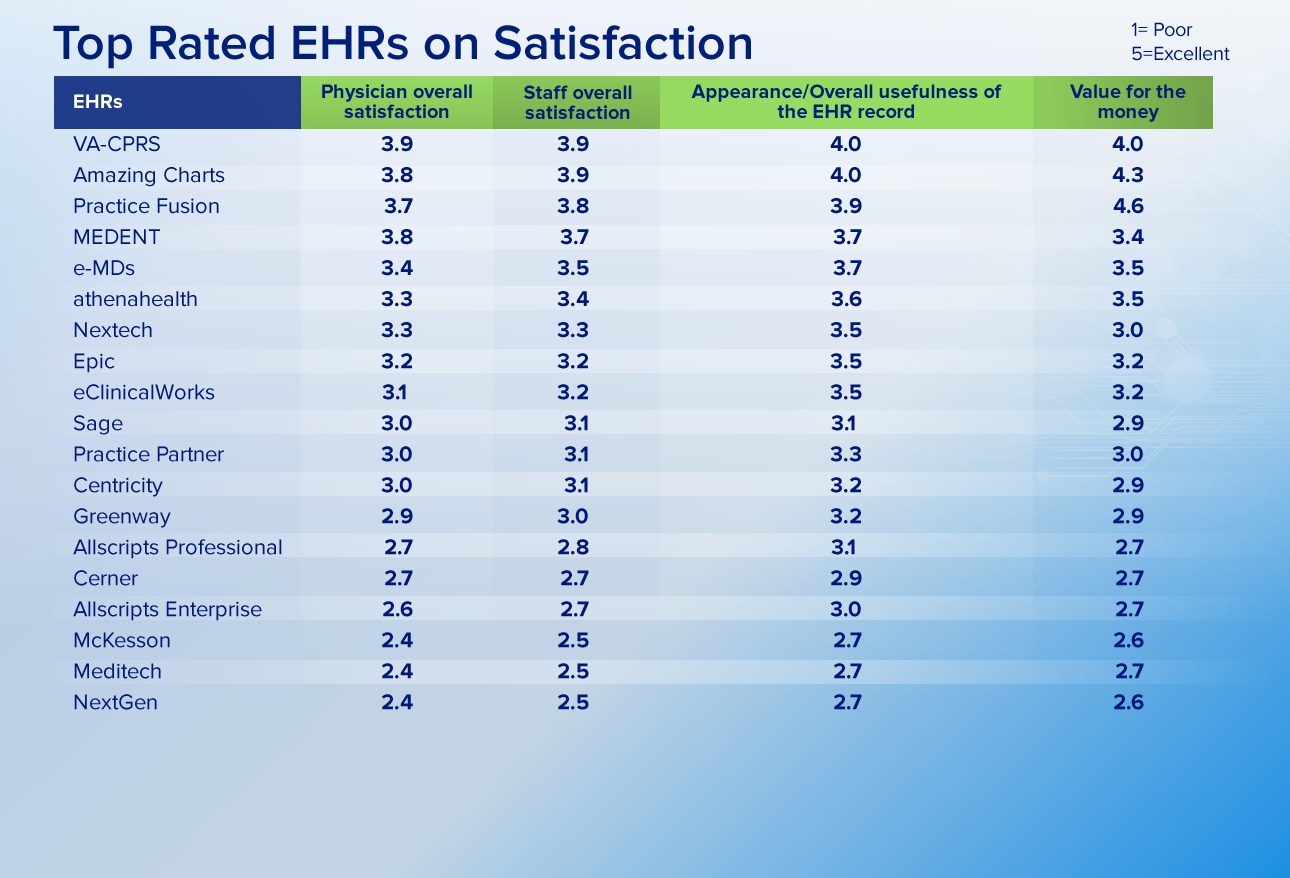

And note that there aren't any of them that score "top box."
FWIW, I despise the whole PG top box nonsense.
There's the link for "include studies" or something like that within the area for radiology results. It pops up the result box and you single click on the study in question then it pulls it in.
I don't use it though because, at least in my shop, when it's overread in the AM it will pull in the final report, not the prelim (resident read)... I want my chart to be more defensible, so I cut/paste the read I use for my MDM.
Semper Brunneis Pallium
For us, it's one click (based on build, as others above have mentioned)... I just don't use it as have been burned by the prelim/final problem before.I can link to the studies, open the studies, but then I have to highlight the text, tell the mic to "copy that, yo", then go back to the chart and right-click/"paste" to get it in there. This is a perfect example of what I was referring to in my prior post - this process should be automatic, or at least "one-click". I am fervently looking for a work-around for this.
I'll also say this for the charting screen... black text on grey background? Who's bright idea was that? Its like looking at a teenager's GeoCities website from teh (sic) 90s.
I trust nothing that lists CraPpeRS first. Blech. Maybe when MS-DOS & the 5.25's were king, but my TI-85 from high school would run a better EMR than CPRS.I'll just leave this here...
I'll just leave this here...
I assume this is overall EHR vs ED specific? I don't see Picis/PulseCheck.
I still maintain Cerner is only as good as your site build. @Daiphon has a pretty good one. That's why I've volunteered to be a super user when we start working on our build here.
Sent from my iPhone using SDN mobile app
Good question. I'm not sure this is overall EHR vs. ED specific. I don't think it would ultimately matter to me, as the note-writing process is by and large the same.
McKesson is bad at baseline. But I know my physician group flat out refused to use their ED tracking board product, and that's why we have PulseCheck.
Sent from my iPhone using SDN mobile app
PulseCheck is *the* best, hands down. Designed by an EM guy (actually a grad of my residency program) for EM.McKesson is bad at baseline. But I know my physician group flat out refused to use their ED tracking board product, and that's why we have PulseCheck.
Sent from my iPhone using SDN mobile app
PulseCheck is *the* best, hands down. Designed by an EM guy (actually a grad of my residency program) for EM.
Semper Brunneis Pallium
No discussion needed. BCMA sux. [emoji6]It won't interface with our ancient inpatient McKesson system, so we can't implement barcode scanning (for better or worse, that's up for discussion...) via PulseCheck. It's still not perfect but it flows pretty nicely.
Sent from my iPhone using SDN mobile app
Bump for a fix to import radiology results easily into the document. Anyone?
So, where do you put in this "shortcut"?

No discussion needed. BCMA sux. [emoji6]
Semper Brunneis Pallium

I can link to the studies, open the studies, but then I have to highlight the text, tell the mic to "copy that, yo", then go back to the chart and right-click/"paste" to get it in there. This is a perfect example of what I was referring to in my prior post - this process should be automatic, or at least "one-click". I am fervently looking for a work-around for this.
I'll also say this for the charting screen... black text on grey background? Who's bright idea was that? Its like looking at a teenager's GeoCities website from teh (sic) 90s.
1. Please tell me how I can get Cerner/Dragon to copy with command "copy that, yo." That command is much more in line with our Philly dialects.
2. You can change the font and color for your charting screen. Some docs I work with use Garamond (so so so painful to read), others have blue color font, another one has a pink background. I'll see if I can remember how when I'm at work tonight. It's one of those things I can't remember unless I'm clicking on it. The font seems to stay when others go to read old notes, but I don't think the text color or background color do.
In the free text box that pops open when you click "other" in the imaging section of the MDM. I suppose I could just put it in anywhere. I assumed that the "=" was similar to "." phrases in Epic?
1. My wife, who is from the Philly area - thanks you for this reply. 🙂
2. Please let me know how to change this.


on the rad result portion of the note, hit "radiology interpretation", then on the top of the window hit the double looking clipboard icon, close the window now go to "other " then pasteBump for a fix to import radiology results easily into the document. Anyone?


Let me know if you know of a better way... this is how I've been doing it. I click reexamination to open the selections seen in the pic below. Then I click "time" and either utilize the current time which is prefilled or adjust the time to represent an earlier evaluation if it's after the fact. Then I open the "vitals" and select the most recent vitals to display. Then I click "notes" and type whatever comments I want to make about the reeval.I always use the notes area of the reeval and it gives you the option to put a time in. I "timestamp" reevals and then go back and dictate the details - don't bother with the clicks, usually the last click box will get you a text box to dictate in.


